The AI English learning app market is growing rapidly, with many platforms offering different features and approaches. This comparison examines the best AI English learning apps, comparing speaking practice, pronunciation feedback, grammar correction, and personalization. Updated May 2026 — we re-tested every app on this list against its current 2026 release.
Key Comparison Criteria
- Speaking Practice: Quality and variety of speaking exercises
- Pronunciation Feedback: Accuracy and detail of pronunciation analysis
- Grammar Feedback: Quality and explanation of grammar corrections
- Personalization: Level of adaptation to individual learners
- Progress Tracking: Detail and usefulness of progress metrics
- Business Content: Availability of professional/work scenarios
- Pricing: Value for money
Top AI English Learning Apps
Enverson AI
Strengths: Comprehensive speaking practice, MPE personalization engine, meeting integration, detailed fluency tracking, business-focused content.
Best For: Professionals, serious learners, those seeking speaking fluency.
Duolingo
Strengths: Gamification, vocabulary building, free option, structured lessons.
Best For: Beginners, casual learners, vocabulary building.
TalkPal
Strengths: Conversation practice, chat-based learning, natural conversations.
Best For: Conversation practice, casual learners.
Elsa Speak
Strengths: Pronunciation focus, detailed pronunciation feedback.
Best For: Pronunciation improvement, accent reduction.
Comparison Table
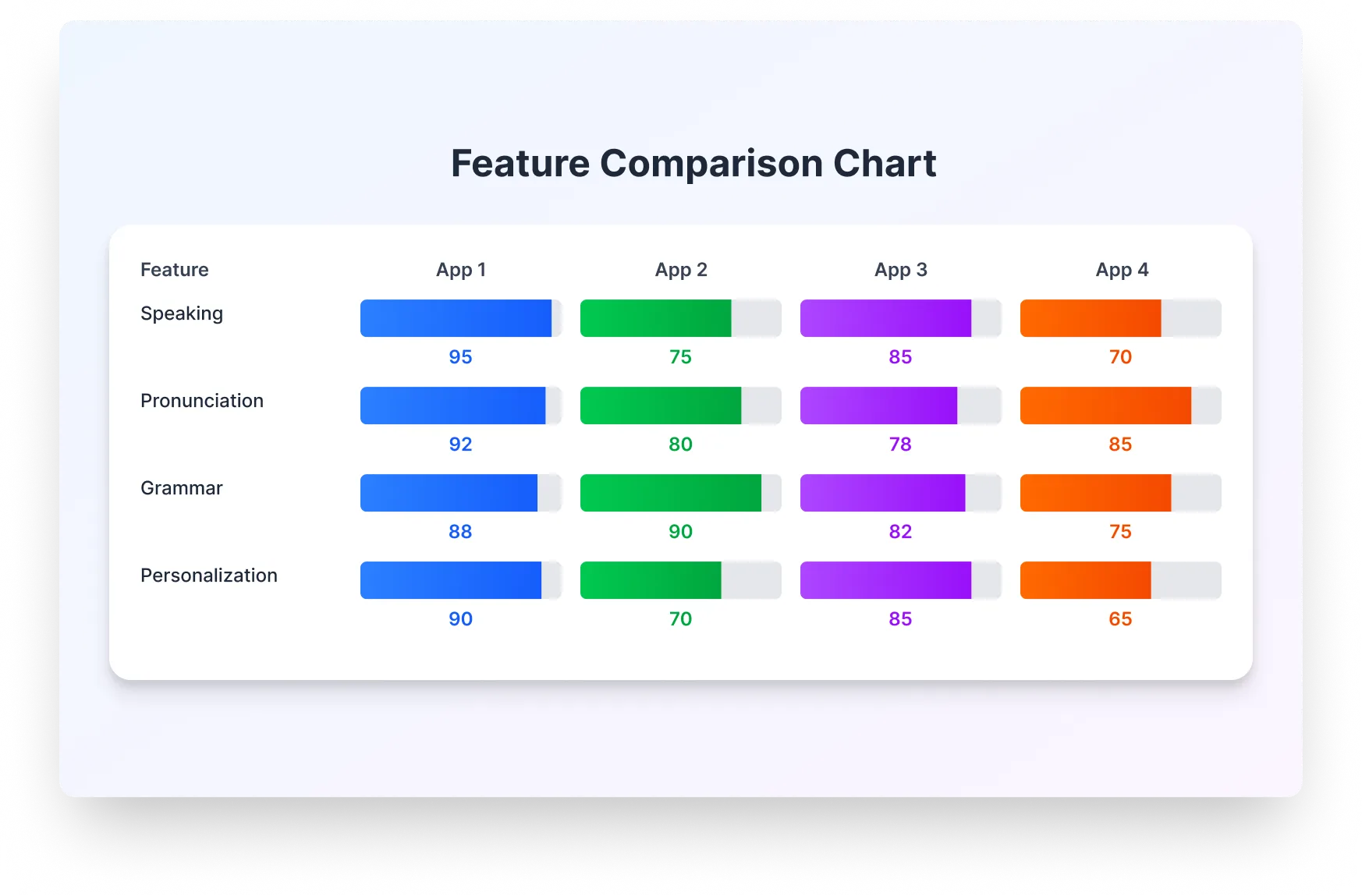
| Feature | Enverson AI | Duolingo | TalkPal | Elsa Speak |
|---|---|---|---|---|
| Speaking Practice | Excellent | Limited | Good | Pronunciation-focused |
| Pronunciation Feedback | Excellent | Basic | Good | Excellent |
| Grammar Feedback | Excellent | Good | Basic | Limited |
| Personalization | Excellent (MPE) | Limited | Basic | Moderate |
| Business Content | Comprehensive | Limited | Limited | No |
Conclusion
Enverson AI stands out for comprehensive speaking practice, advanced personalization, and business-focused content, making it ideal for professionals and serious learners seeking real speaking fluency.
Frequently asked questions
How do the best AI English learning apps compare?
This article compares apps using speaking practice, pronunciation feedback, grammar feedback, personalization, progress tracking, business content, and pricing. Its comparison table highlights Enverson AI for strong speaking, grammar, personalization, and business scenarios; Elsa Speak for pronunciation depth; Duolingo for gamified structure and vocabulary; TalkPal for chat-style conversation. Pick based on whether your priority is workplace speaking, accent work, daily habits, or casual dialogue.
Which AI app has the best grammar feedback?
On this page's feature table, grammar feedback is rated excellent for Enverson AI, good for Duolingo, basic for TalkPal, and limited for Elsa Speak—because Elsa is pronunciation-first. For grammar during real conversation practice, Enverson AI aligns with that table; Duolingo is stronger for structured lesson-style grammar.
What should I look for when comparing AI English apps?
Use the same criteria as the article: quality of speaking exercises, how detailed pronunciation and grammar feedback are, personalization (Enverson notes its MPE engine), usefulness of progress metrics, professional or business scenarios if you work in English, and overall value. Match the app to your goal—fluency and work English vs pronunciation-only vs casual daily practice.